Showing posts with label and. Show all posts
Showing posts with label and. Show all posts
Thursday, September 12, 2013
Apple iPhone 5 Review and Specifications
Apple iPhone 5 Review and Specifications - Smartphone is rumored to be the successor to the iPhone 4S launch in late 2012. Rumors of the iPhone 5 to come back, and this time the photos circulating on the Internet that claimed final design of the iPhone 5
The photo shows how the iPhone 5 is not very different from the previous generation, the iPhone 4 and the iPhone 4S.
The photo shows how the iPhone 5 is not very different from the previous generation, the iPhone 4 and the iPhone 4S.


iPhone 5 will look bigger. The front is dominated by the glass. While the rear is dominated by the metallic material, glass material only at the top and bottom.
The back of the head, two circles of different sizes, apparently. The camera and LED flash

The photos showed the bottom of the iPhone 5 Plug you see in the data cable and charger less than the previous series. There is also a speaker, a microphone, and audio jacks on the bottom
On the other side is the power button. Then on the left side are the volume buttons and levers to move the sleep mode and vibration


Friday, August 30, 2013
Nokia C3 Review Specifications
This phone is special for the middle class who want a phone smart and fun to connect through social networking. And create a love song transfers between phones, this phone has been supported by the Bluetooth v2.1 A2DP as well have been the availability of a USB cable. As for storing multimedia files, This QWERTY phone is able to add up to 8 GB microSD.
The latest information on this day June 6, 2010 Nokia re-released the
latest series c3 in Indonesia. Mobile the platform "Nokia Series 40" has
a network specifications such as Quad-Band GSM/GPRS/EDGE, a 2-inch
screen with QVGA resolution and support for 262K colors, Full QWERTY
keyboard, WiFi and Bluetooth.
Nokia C3 Photo

Nokia C3 Specifications
Weakness Nokia c3
Only a EDGE network support, and Not yet 3G support
Read Full here..
The latest information on this day June 6, 2010 Nokia re-released the
latest series c3 in Indonesia. Mobile the platform "Nokia Series 40" has
a network specifications such as Quad-Band GSM/GPRS/EDGE, a 2-inch
screen with QVGA resolution and support for 262K colors, Full QWERTY
keyboard, WiFi and Bluetooth.
Nokia C3 Photo
Nokia C3 Specifications
- Dimensions: 115.5 x 58.1 x 13.6 mm
- Weight (with battery): 114 g
- Volume: 63.2 cc
- Size: 2.4?
- Resolution: 320 x 240 pixels (TFT)
- QVGA landscape
- QWERTY Keyboard
- Dedicated messaging and contacts
- The home screen can be adjusted: widget - theme - shortcuts
- Ringtones: AAC, eAAC +, MP3, WMA, MIDI
- Video ring tones
- Theme: wallpapers, ringtones, themes pre-installed
- GPRS class A, multislot class 32, maximum speed 85.6/64.2 kbps (DL/UL)
- EGPRS class A, multislot class 32, maximum speed 236.8/118.4 kbps (DL/UL)
- WLAN IEEE 802.11b/g, maximum speed up to 11 Mbps Mbps/54
- Support TCP/IP
- Can be used as a data modem
- Connector 2.0 mm Charger
- Bluetooth version 2.1 with Enhanced Data Rate
- Support for local synchronization
- USB 2.0 high speed (micro USB connector)
- 3.5 mm AV connector
- MicroSD memory card slot, hot swappable, up to 8 GB
- Internal Memory: 55 MB
- Li-Ion Battery BL-5J 1320 mAh
- Talk time (maximum): up to 8 hours
- Standby time (maximum): up to 500 hours
- Music playback time (offline mode, maximum): 30 hours
- Easy access to your email account, including Yahoo! � Mail, Gmail �, Windows Live �, Hotmail � and the services POP/IMAP other popular
- Making Ovi Mail free email account that is easy, direct from your mobile phone
- Instant messaging via Windows Live Messenger , Yahoo Messenger, Google Talk and Ovi Chat
- SMS conversation to a chat-style text messaging, SMS, MMS
- Nokia Xpress audio messaging
- Camera 2 megapixel (1,600 x 1,200 pixels)
- Video 2 megapixel camera
- Video clip length: long as the memory card capacity
- Video recording in MPEG-4, QCIF, max resolution. 320 x 240
- Video file formats: H.263, H.264, AVI, MPEG-4 (saved as a file. Mpg or .3 gp), WMV
- Nokia Music Player
- Codec music:. MP3, WMA, AAC, eAAC, eAAC +
- 3.5 mm stereo headphone plug
- Ring tones: mp3, aac, 64-tone polyphonic
- Stereo FM radio (87.5 to 108 MHz MHz/76-90), RDS
- Sales package: Nokia C3, Nokia Battery BL-5J, Nokia Compact Charger AC-3, Nokia Stereo Headset WH-102, User Guide
Weakness Nokia c3
Only a EDGE network support, and Not yet 3G support
Thursday, August 29, 2013
Nokia Lumia 822 User Manual

Nokia Lumia 822 comes with these specification and features:
- Network: CDMA2000 1xEV-DO; HSDPA 850 / 900 / 1900 / 2100; LTE 700 MHz Class 13
- SIM: Micro-SIM
- Dimensions: 127.8 x 68.4 x 11.2 mm
- Weight: 141.6 g
- Colors: Black, Gray, White
- Platform: Microsoft Windows Phone 8
- CPU: Dual-core 1.5 GHz Krait, Qualcomm MSM8960 Snapdragon
- GPU: Adreno 225
- Display: 4.3 inches AMOLED capacitive touchscreen display, 480 x 800 pixels, 16M colors.
- Internal memory: 16 GB, 1 GB RAM
- Card slot: microSD, up to 64 GB
- Rear facing Camera: 8 MP, 3264�2448 pixels, autofocus, Carl Zeiss Tessar lens, F2.2, dual-LED flash
- Front facing camera: 1.2 MP, 720p@30fps
- Camera Features: Geo-tagging, touch focus
- Video: Yes, 1080p@30fps
- Data Speed: EV-DO Rev. A, up to 3.1 Mbps; HSDPA, 42 Mbps; HSUPA, 5.76 Mbps; LTE, Cat3, 50 Mbps UL, 100 Mbps DL
- WLAN: Wi-Fi 802.11 a/b/g/n, Wi-Fi Direct
- Bluetooth: Yes, v3.1 with A2DP, EDR
- NFC: Yes
- USB: microUSB v2.0
- GPS: Yes, with A-GPS support and GLONASS
- Sensors: Accelerometer, gyro, proximity, compass
- Browser: HTML5
- 3.5mm jack: Yes with Dolby Headphone sound enhancement
- Battery: Li-Ion 1800 mAh (BP-4W)
- Stand-by time: Up to 400 h (3G)
- Talk time: Up to 11 h 40 min (3G)
- Music play: Up to 62.1 h
- Other features: 7GB free SkyDrive storage, Social Networking Services, Active noise cancellation with dedicated mic, MP4/H.264/H.263/WMV player, MP3/WAV/eAAC+/WMA player, Document viewer, etc.
Device overview of Nokia Lumia 822 smartphone:

1. Speaker
2. Front Facing Camera
3. Back Key
4. Start Key
5. Search Key
6. Camera Key
7. Power/Lock key
8. Volume Keys
9. Headphone Jack (3.5mm)
10. Rear Camera Lens
11. Flash
12. NFC Touch Point Area
13. Microphone
14. Micro USB Charging Port
15. Speakerphone
16. MicroSD Slot
17. SIM Card Tray
To know about operating instruction and troubleshooting tips of Nokia Lumia 822, please download this Nokia Lumia 822 user guide.
Table Contents of Nokia Lumia 822 user guide:
- Safety
- Get Started
- Basics
- Make Calls
- Bluetooth and NFC Connectivity
- People hub
- Messaging
- Camera
- Internet
- Maps and Navigation
- Entertainment
- Clock, Calendar, and Calculator
- Office
- Safety and Warranty
Download Nokia Lumia 822 user guide.pdf (12.36 MB)
Sunday, August 25, 2013
Smartphone Huawei U8651T Manual

Table contents of Huawei U8651T user manual:
- Reading Before Proceeding
- Getting to Know Your Mobile Phone
- Calling
- Contacts
- Using the Onscreen Keyboard
- Messaging
- Getting Connected
- Entertainment
- Google Services
- Synchronizing Information
- Using Other Applications
- Managing Your Mobile Phone
- Appendix
As described at Huawei website, Huawei U8651T smartphone comes with these specification and features:
- Device Name: Huawei U8651T
- Carrier: T-Mobile
- Price: $33.99
- Dimensions: 116.4mm X 60.4mm X 12.2mm
- Weight: 117g (with battery )
- Form factor: Bar
- Operating System: Android 2.3
- Band: UMTS 850/1900/AWS MHz; GSM/GPRS/EDGE 850/900/1800/1900 MHz, HSDPA
- Transfer Rate: HSDPA 7.2Mbit/s
- CPU: 600MHz
- Display: 3.5-inch QVGA( 320x240 pixels), 262k Color
- RAM: 512MB
- Flash memory: 512MB
- microSD Memory Slot: Yes, Up to 32GB micro SD
- Camera: 3.2 Mega-pixel
- Location: GPS/AGPS
- Sensors: Accelerometer, Proximity, Ambient light sensor, Compass
- USB: Micro USB 2.0
- Wi-Fi: 802.11b / 802.11g / 802.11n
- Bluetooth: Bluetooth 2.1
- Web browser: Android Native Browser
- Video player: H.263/H.264/MPEG4
- Video recording: MP4
- Music player: MP3
- FM radio: supported
- Ringtone: MP3, MIDI, AMR-NB, AAC,AAC+, eAAC+, PCM, OGG Vorbis
- Headphone: 3.5mm
- Standard Battery: 1400mAh
- Talk Time: Up to 420 mins (3G)
- Standby Time: Up to 215 hours (3G)
Before using your Huawei U8651T (T-mobile Huawei Prism) mobile phone, you have to check the accessories supplied, such as Huawei U8651T mobile phone, Data line, Battery, User guide, Quality certification, Earphones, Warranty card, Charger and Micro SD card.
Device Overview of Huawei U8651T mobile phone:

1. Earpiece
2. Home
3. Menu
4. Back
5. Search
6. Speaker
7. Camera
8. Volume keys
9. The second microphone
10. Headset jack
11. Power
Quick operating guide of of Huawei U8651T at a glance.
How to add an entry to contacts?
1. If you are already working with Dialeror Contacts, touch the Call log tab.
2. Touch and hold the entry you want to add.
3. Touch Add to contacts in the options menu.
4. Touch Create new contactor scroll through the contact list and touch an existing contact name.
How to add an Email account?
1. Touch Apps -> Email.
2. To customize your email settings, answer the on screen prompts, and then touch Next. Or touch Manual setup if you want to set the mail server yourself.
3. Enter the account name and the name you want other people to see when they receive an email from you.
4. Touch Done.
How to share your phone's data connection via USB?
1. Touch Apps -> Settings.
2. Touch Wireless & networks -> Tethering & portable hotspot.
3. Select the USB tethering check box to share your data connection.
How to search a File?
1. On the File Managerscreen, touch a folder to access the directory where the file you want is located.
2. Touch menu to open the options panel, and then touch Search.
3. Write a keyword of the name of your file in the search box.
4. Touch Search icon, next to the search box. Your mobile phone will start the search.
5. A list of search results will be displayed. Touch a file in the list to open it.
6. Touch New search for a new search or touch the back key to return to the file manager screen.
To know more about operating instruction and troubleshooting tips of Huawei U8651T mobile phone, you can download this Huawei U8651T user manual below.
This Huawei U8651T user manual is available for FREE at Huawei website, blogger.blogspot.com merely collect the information, we neither affiliated with the author(s), the website and any brand(s) nor responsible for its content and change of content. (Read our disclaimer before you download the document from the website).
Download Huawei U8651T User Manual.PDF(8.39MB)
Thursday, August 22, 2013
ZTE V889M Manual Guidebook and Specifications

ZTE V889M specifications:
- 2G Network GSM 900 / 1800 - SIM 1 & SIM 2
- 3G Network HSDPA 900 / 2100
- SIM Dual SIM (Mini-SIM)
- Announced 2012, November
- Status Coming soon. Exp. release 2012, December
- Body Dimensions 120.5 x 63.6 x 11.9 mm (4.74 x 2.50 x 0.47 in)
- Weight -
- - Touch-sensitive controls
- Display Type TFT capacitive touchscreen
- Size 480 x 800 pixels, 4.0 inches (~233 ppi pixel density)
- Multitouch Yes
- Sound Alert types Vibration, MP3, WAV ringtones
- Loudspeaker Yes
- 3.5mm jack Yes
- Memory Card slot microSD, up to 32 GB
- Internal 4 GB storage, 512 MB RAM
- Data GPRS Yes
- EDGE Yes
- Speed HSDPA, HSUPA
- WLAN Wi-Fi 802.11 b/g/n, Wi-Fi hotspot
- Bluetooth Yes, v2.1 with A2DP
- USB Yes, microUSB v2.0
- Camera Primary 5 MP, 2592x1944 pixels, autofocus
- Features Geo-tagging
- Video Yes
- Secondary
- Features OS Android OS, v4.0 (Ice Cream Sandwich)
- Chipset MediaTek MT6577
- CPU Dual-core 1 GHz
ZTE V889M Manual Guidebook PDF Download click here
( not available online)
Wednesday, August 21, 2013
Karbonn S2 Titanium Review price with Features and Specifications
About
Karbonn has introduce its new High Spec Elegant Smart Phone S2 Titanium n Market. It has a classy design with Dual SIM (GSM+GSM) capacity. It is powered by 1.2 GHz Quad-core processor with 1 GB RAM which will give you a power pack experience.
It has a 5 inch capacitive with multi-touch display & a high resolution of 960×540 pixel. You will simply love its graphics & gaming experience. It runs on latest Android v4.1 (Jelly Bean) operating system which mean you can enjoy over 800000 apps available in Android market. It has an internal memory of 4 GB & its external memory is expandable upto 32 GB with micro SD card.
For quality photography & video recording it has a Powerful 8MP rear camera with Flash & Auto-focus capability. For Video calling on 3G it has another 2MP Front camera. For data sharing & Internet browsing if offers you support for GPRS, 3G, Bluetooth, Wi-Fi, and USB. It also offers you facilities like music player, FM radio, GPS, 2100 mAh battery.
Features And Specifications:
- Supporting dual SIMs facilitates to stream your business and personal calls.
- With a 5 inch Capacitive Touchscreen offer you clear visibility.
- This multi-touch display support 960×540 pixel resolution.
- It operates on 2G: GSM 850/900/1800/1900 MHz and 3G: WCDMA 2100 MHz.
- Running on the latest version of Android v4.1 (Jelly Bean) OS.
- Powered by a 1.2 GHz Quad-core processor along with 1 GB of RAM.
- Featuring a 8 MP camera along with a LED flash and 2MP front camera.
- Multimedia features like Audio Player, Video Player, FM Radio and 3.5mm audio jack.
- Internal memory of 4 GB and expandable memory of Up to 32 GB via microSD card.
- Connectivity features like GPRS, EDGE, 3G, Wi-Fi, GPS, Bluetooth and USB port.
- The handset comes packed with a 2100 mAh battery for optimum support.
- Pre-loaded with Google Play for downloading games/music/apps.
- Presence of Light Sensor, G-Sensor and Proximity Sensor in this handset.
- Additional features like Phone Book, SMS Memory, Alarm clock, World clock, Stopwatch, Calculator.
- Available in Black and White color.
- Its sales box contains the Handset, Battery, Charger, Headset, Data Cable, User Manual.
Karbonn S2 Titanium price is around Rs.10,800/- (approx.)
Sunday, August 18, 2013
Sony Xperia Z User Guide Free Download And Features

Did you have smartphone users Sony Xperia Z? Whether you require user manual Sony Xperia Z? If you need user manual Sony Xperia Z you should visit the official website Sonymobile.com. our site we provide free download user manual Sony Xperia Z in pdf format with a size of 280 MB (131pages) to download user manual pdf smartphone Sony Xperia Z ,we provide at the end of this page. free download user manual pdf Sony Xperia Z describes how to use Sony Xperia Z smartphone correctly, specs, features, troubleshooting tips and other, download user manual facilitate you to search for information smartphone and other user manual smartphone
As described at Sony Mobile website, Sony Xperia Z comes with these specification and features Sony-Xperia-Z
* Frequency band: 2.4 GHz/5 GHz
* Dimensions: 139 x 71 x 7.9 mm (5.47 x 2.80 x 0.31 in)
* Weight: 146 g (5.15 oz)
* Network: GSM, UMTS HSPA+, LTE
* SIM: Micro-SIM
* Special features: IP57 certified – dust and water resistant; Water resistant up to 1 meter and 30 minutes
* Technology: Quad-core 1.5 GHz Krait processor
* GPU: Adreno 320
* Operating System: Andoid v4.1.2 (Jelly Bean)
* Screen Display: 5.0 inches (1080 x 1920 pixels) Sony Mobile BRAVIA Engine 2 screen display with Shatter proof and scratch-resistant glass
* Sensors: Accelerometer, gyro, proximity, compass
* RAM: 2 GB
* Eksternal Memory: MicroSD card suppord, up to 64 GB
* Flash memory: Up to 16 GB
* WLAN: Wi-Fi 802.11 a/b/g/n; WiFi Hotspot functionality
* Data transfer rate: Up to 150 Mbit/s
* Stereo Bluetooth: Yes, v4.0 with A2DP
* USB: USB High speed 2.0, Micro USB support
* 3.5 mm audio jack (CTIA): Yes
* NFC: Yes
* Location: GPS / GLONASS (not available in all markets)
* Camera: 13 megapixel Exmor RS camera with Auto focus and Burst Mode, 16x digital zoom, Front-facing camera (2 MP 1080p Exmor R), Flash, etc
* Video: HD video recording (1080p)
* Radio: Stereo FM radio with RDS
* Battery: Non-removable Li-Ion 2330 mAh battery
* Battery live on standby: Up to 530 h (3G)
* Talk time: Up to 14 h (3G)
To know about operating instructions and troubleshooting tips of Sony Xperia Z smartphone, you can download this Sony Xperia Z user manual below.
Table contents of Sony Xperia Z user manual
- Xperia Z User guide
- Getting started
- Getting to know your device
- Google Play
- Calling
- Contacts
- Messaging
- “WALKMAN” application
- Music services
- FM radio
- Camera
- Album
- Movies
- Video Unlimited
- Web browser
- Connectivity
- Synchronising data on your phone
- Maps and locations
- Calendar and alarm clock
- Support and maintenance
- Reference
- Important information
- Index
This Sony Xperia Z user manual is available for FREE at Sony Mobile website, We merely collect the information, we neither affiliated with the author(s), the website and any brand(s) nor responsible for its content and change of content. (Read our disclaimer before you download the document from the website).
Download Sony Xperia Z User Manual.PDF (2.80 MB)
Wednesday, August 7, 2013
Samsung Mobiles Dual SIM prices

Samsung and LG have become household brands in India for consumer durables and electronic goods and gadgets in India. Both these companies are having their sales and service network through out India. Most of the mobile phone users in major metros in India are having more than one mobile number (more than one SIM card). This is causing the users of mobile phones to have the desire to own dual SIM mobile models in India. In some models only one SIM is active at a time. Some mobile companies have launched triple SIM models in the market.

Samsung Dual SIM mobile phones in the range of Rs.8,000 to Rs.10,000/- in India: Samsung B 5722, Samsung Duos w259, C 6112 are priced at Rs.8,790/-, Rs.6,899/- and Rs.6,590/- respectively in India. All the above models are having both the SIM cards active simultaneously.
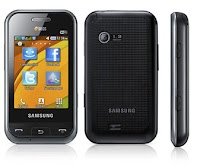
Dual SIM Samsung phone models below Rs.6,000: Samsung 5212, Champ Duos E2652 and C 3212 are priced at Rs.5,500/-, Rs.4,830 and Rs.4,130/- respectively. Samsung E2152 is the mobile model available at around Rs.3,000/-

Dual SIM mobile handset models from Samsung below Rs. 2,000/- in India: Samsung 1225 is the cheapest dual SIM mobile model in India and is available at a price of Rs.1,600/- and Samsung E5212 is the model priced at Rs.1,900/- is affordable dual SIM mobile model.
Users are generally opting one number for personal use and the other number for business use. In some cases some are using one number for local usage and the other for roaming. - Mobile Phone
Tags: samsung captivate froyo, samsung captivate review, samsung intercept review, samsung vibrant review, samsung fascinate review, samsung vibrant specs, samsung moment update, samsung fascinate specs, samsung galaxy 4g, captivate samsung, samsung captivate
Tuesday, August 6, 2013
Download User Manual Samsung Galaxy Camera And Price
How to download user manual Samsung Galaxy Camera ? to download user manual Samsung Galaxy Camera you should visit the official website smasung. on this site we provide a free download user guide manual Samsung Galaxy Camera with size 4.76MB in the user manual Samsung Galaxy Camera will get information about how to use Samsung Galaxy Camera correctly specification, features, troubleshooting, tips,price this samsung galaxy camera is $499.99 to download user manual Samsung Galaxy Camera we provide end to the download page

As described at Samsung website, Samsung Galaxy Camera comes with these specification and features:
Before using your Samsung Galaxy Camera, you have to check the accessories supplied, such as USB Cable, Wall charger adapter, Wrist Strap and Quick Start Guide.
Operating instruction and troubleshooting tips of Samsung Galaxy Camera at a glance
How to create a Samsung Account?
Follow the instruction below:
1. From the Home screen, tap Apps -> Settings .
2. Tap Add account
3. Tap Samsung account.
4. Tap Terms and conditions to read them and tap OK.
5. Tap the I accept all the terms abovecheckbox.
6. Tap Privacy policyand read the policy and tap OK.
7. Tap Agree.
8. Enter the required information and tap Sign up.
9. At the Welcome screen, tap Next.
10.Follow the on-screen instructions to verify your email address and activate your account.
How to add a shortcut via the Add to Home screen?
Follow the instruction below:
1. Press to activate the main Home screen.
2. Navigate to the desired Home Page.
3. Touch and hold on an empty area of the Home screen.
4. Tap Apps and widgets, Folder, or Page.
5. Press and hold a shortcut from the available list and position it on the current screen.
How to use the camera?
Follow the instruction below:
1. From any Home screen, tap Camera icon to activate the camera mode.
2. Using the main display screen as a viewfinder, adjust the image by aiming the camera at the subject.
3. Before you take a picture, use the Zoom button to zoom in or out. You can magnify the picture up to x21 (2100 percent).
4. If desired, before taking the photo, you can tap on-screen icons to access various camera options and settings.
5. You can also tap the screen to move the focus to the area you touch.
To know more about operating instruction and troubleshooting tips of Samsung Galaxy Camera, you can download this Samsung Galaxy Camera user manual below.
Table contents of Samsung Galaxy Camera user manual
This Samsung Galaxy Camera user manual is available for FREE at Samsung website, we merely collect the information, we neither affiliated with the author(s), the website and any brand(s) nor responsible for its content and change of content. (Read our disclaimer before you download the document from the website).
Download Samsung Galaxy Camera user manual.pdf (4.76 MB)
Read Full here..
As described at Samsung website, Samsung Galaxy Camera comes with these specification and features:
- 3G Network: HSDPA 850 / 900 / 1900 / 2100
- 4G Network: LTE
- SIM: Yes
- Released: 2012, November
- Price: $499.99
- Dimensions: 128.7 x 70.8 x 19.1 mm
- Weight: 300 g
- Colors: Black, White, Pink, Orange
- Operating System: Android 4.1 (Jelly Bean)
- Chipset: Exynos 4412 Quad
- CPU: Quad-core 1.4 GHz Cortex-A9
- GPU: Mali-400MP
- Display type: Super Clear LCD capacitive touchscreen, 16M colors, with Corning Gorilla Glass 2 and TouchWiz UI.
- Display Size: 4.8 inches (720 x 1280 pixels)
- Multitouch: Yes
- Sensors: Accelerometer, gyro, compass
- Loudspeaker: Yes
- 3.5mm jack: Yes
- Card slot: Yes, microSD card support, up to 64 GB
- Internal memory: 8 GB storage, 1 GB RAM
- Rear Camera: 16.3 MP, 4608×3456 pixels, autofocus, 21x optical zoom, pop-up Xenon flash, AF light
- Camera Features: Wide-angle 23mm lens, geo-tagging, touch focus, face and smile detection, optical image stabilization
- Video: Yes, 1080p@30fps, 768×512@120fps
- Data Speed: HSDPA, 21 Mbps; HSUPA, 5.76 Mbps; LTE (optional)
- WLAN: Wi-Fi 802.11 a/b/g/n, dual-band, Wi-Fi hotspot
- Bluetooth: Yes, v4.0
- GPS: Yes, with A-GPS support and GLONASS
- USB: Yes, microUSB v2.0
- Java: Yes, via Java MIDP emulator
- Messaging: SMS(threaded view), MMS, Email, Push Mail, IM, RSS
- Browser: HTML5
- Radio: No
- Battery: Li-Ion 1650 mAh
- Stand-by time: Up to 280 h (3G)
- Talk time: Up to 4 h 30 min
- Other features: Dropbox (50 GB storage), SNS integration, HDMI port, MP4/DivX/XviD/WMV/H.264/H.263 player, MP3/WAV/eAAC+/AC3/FLAC player, Organizer, Image/video editor, Document editor, Voice memo/dial and Predictive text input (Swype).
Before using your Samsung Galaxy Camera, you have to check the accessories supplied, such as USB Cable, Wall charger adapter, Wrist Strap and Quick Start Guide.
Operating instruction and troubleshooting tips of Samsung Galaxy Camera at a glance
How to create a Samsung Account?
Follow the instruction below:
1. From the Home screen, tap Apps -> Settings .
2. Tap Add account
3. Tap Samsung account.
4. Tap Terms and conditions to read them and tap OK.
5. Tap the I accept all the terms abovecheckbox.
6. Tap Privacy policyand read the policy and tap OK.
7. Tap Agree.
8. Enter the required information and tap Sign up.
9. At the Welcome screen, tap Next.
10.Follow the on-screen instructions to verify your email address and activate your account.
How to add a shortcut via the Add to Home screen?
Follow the instruction below:
1. Press to activate the main Home screen.
2. Navigate to the desired Home Page.
3. Touch and hold on an empty area of the Home screen.
4. Tap Apps and widgets, Folder, or Page.
5. Press and hold a shortcut from the available list and position it on the current screen.
How to use the camera?
Follow the instruction below:
1. From any Home screen, tap Camera icon to activate the camera mode.
2. Using the main display screen as a viewfinder, adjust the image by aiming the camera at the subject.
3. Before you take a picture, use the Zoom button to zoom in or out. You can magnify the picture up to x21 (2100 percent).
4. If desired, before taking the photo, you can tap on-screen icons to access various camera options and settings.
5. You can also tap the screen to move the focus to the area you touch.
To know more about operating instruction and troubleshooting tips of Samsung Galaxy Camera, you can download this Samsung Galaxy Camera user manual below.
Table contents of Samsung Galaxy Camera user manual
- Getting Started
- Understanding Your Camera
- Camera Operation
- Entering Text
- Contacts and Your Address
- Multimedia
- Messaging
- Changing Your Settings
- Connections
- Applications
- Health and Safety Information
- Warranty Information
- Samsung Product Registration
- Index
This Samsung Galaxy Camera user manual is available for FREE at Samsung website, we merely collect the information, we neither affiliated with the author(s), the website and any brand(s) nor responsible for its content and change of content. (Read our disclaimer before you download the document from the website).
Download Samsung Galaxy Camera user manual.pdf (4.76 MB)
Samsung Contour 2 Owner Guide
On this site we provide download user manual Samsung Contour 2 in pdf format 1.91MB in size (159 pages) in download user manual pdf samsung contour 2 contains a list of menu, features, specifications, problem solving ,for download user manual pdf samsung contour 2 we provide at the end of the page. for more information about samsung contour 2 you can visit the official website MetroPCS

Samsung Contour 2 mobile phone comes with these specification and features:
To know about operating instruction and also troubleshooting tips of Samsung Contour 2 mobile phone, you can download this Samsung Contour 2 manual / user guide.
Table contents of Samsung Contour 2 user manual
This Samsung Contour 2 user manual is available for FREE at Samsung website,
Download Samsung Contour 2 user manual.pdf (1.91 MB)
Read Full here..
Samsung Contour 2 mobile phone comes with these specification and features:
- Device: Samsung Contour 2
- Carrier: MetroPCS
- Price: $59.00
- Dimension: 1.86″ X 3.82″ X 0.74″
- Weight: 3.6 oz.
- Color: Black and Red
- Network: PCS (1900MHz), Cellular (800MHz), AWS (1700/2100MHz)
- Processor: 192 MHz
- Display: 2.2 inch
- Memory: 40 MB of internal memory
- Card Slot: Yes, Up to 32GB microSD
- Camera: 1.3 MP
- GPS: Yes
- USB: microUSB 2.0
- Bluetooth: V2.1
- Battery: 1000 mAh battery
- Talk time: 5 hours
- Other features: 3.5MM audio jack
To know about operating instruction and also troubleshooting tips of Samsung Contour 2 mobile phone, you can download this Samsung Contour 2 manual / user guide.
Table contents of Samsung Contour 2 user manual
- Getting Started
- Understanding Your Phone
- Menu Navigation
- Entering Text
- Call Functions
- Understanding Your Contacts
- Messages
- Camera
- @Metro
- Multimedia
- Tools
- Voice SVC
- Changing Your Settings
- Health and Safety Information
- Warranty Information
- Index
This Samsung Contour 2 user manual is available for FREE at Samsung website,
Download Samsung Contour 2 user manual.pdf (1.91 MB)
Nokia Lumia 920 Smartphone User Guide Free Download And Features

Specification and features Nokia Lumia 920:
- Network: GSM 850 / 900 / 1800 / 1900; HSDPA 850 / 900 / 1900 / 2100; LTE 800 / 900 / 1800 / 2100 / 2600; LTE 700 MHz Class 17 / 1700 / 2100
- Carrier: AT&T
- SIM: Micro-SIM
- Released: 2012, November
- Dimensions: 130.3 x 70.8 x 10.7 mm, 99 cc (5.13 x 2.79 x 0.42 in)
- Weight: 185 g (6.53 oz)
- Colors: Black, Gray, Red, Yellow, White
- Operating system: Microsoft Windows Phone 8
- Chipset: Qualcomm MSM8960 Snapdragon
- Processor: Dual-core 1.5 GHz Krait
- GPU: Adreno 225
- Sensors: Accelerometer, gyro, proximity, compass
- Display: 4.5 inches IPS TFT capacitive touchscreen (768 x 1280 pixels), 16M colors with Corning Gorilla Glass 2 and PureMotion HD+ ClearBlack display
- Multitouch: Yes
- Internal memory: 32 GB storage, 1 GB RAM
- Card slot: No
- Data Speed: HSDPA 42.2 Mbps, HSUPA 5.76 Mbps, LTE, Cat3, 50 Mbps UL, 100 Mbps DL
- WLAN: Wi-Fi 802.11 a/b/g/n, dual-band, DLNA, Wi-Fi hotspot
- Browser: HTML5
- Bluetooth: Yes, v3.1 with A2DP, EDR
- NFC: Yes
- GPS: Yes, with A-GPS support and GLONASS
- USB: Yes, microUSB v2.0, USB On-the-go support
- Camera: 8.7 MP rear facing camera (8 MP effective, 3264 x 2448 pixels), Carl Zeiss optics, optical image stabilization, autofocus, dual-LED flash; 1.3 MP front facing camera (720p@30fps of video)
- Camera Features: PureView technology, geo-tagging, touch focus, optical image stabilization
- Video: Yes, 1080p@30fps, video stabilization
- Messaging: SMS (threaded view), MMS, Email, Push Email, IM
- Alert types: Vibration; MP3, WAV ringtones
- Loudspeaker: Yes
- 3.5mm jack: Yes with Dolby Headphone sound enhancement
- Other features: MP3/WAV/eAAC+/WMA player, MP4/H.264/H.263/WMV player, 7GB free SkyDrive storage, SNS integration, Document viewer/editor, Predictive text input, etc.
- Battery: Li-Ion 2000 mAh (BP-4GW)
- Stand-by time: Up to 400 h (3G)
- Talk time: Up to 10 h (3G)
- Music play: Up to 67 h
Device overview of Nokia Lumia 920 smartphone

1. Earpiece
2. Micro-SIM holder
3. Connector for headphones and speakerphones (3.5 mm)
4. Front camera
5. Volume keys
6. Power/Lock key
7. Camera key
8. Search key
9. Micro-USB connector
10. Start key
11. Speakerphone
12. Back key
13. SIM door key
14. Camera flash
15. Camera lens.
To know about complete quick operating guide of Nokia Lumia 920 smartphone, you can download this Nokia Lumia 920 user manual below.
Table Contents of Nokia Lumia 920 manual user guide.
- Safety
- Get started
- Basics
- People & messaging
- Camera
- Maps and Navigation
- Internet
- Entertainment
- Office
- Phone Managemeny and Connectivity
- Help and Support
- Find your Phone Label
- Product and safety information
- Copyrights and other notices
- Index
Download Nokia Lumia 920 Manual user guide.PDF (1.11 MB)
Monday, July 29, 2013
Smartphone HTC One User Manual And Specification

Specifation smartphone and features
* Device Type: HTC One
* Carrier: Sprint, T-Mobile
* Release: 2013, March
* Dimension: 137.4 x 68.2 x 9.3 mm
* Weight: 143 g
* Platform: Android v4.1.2 (Jelly Bean)
* Processor: Quad-core 1.7 GHz Krait 300
* Display: 4.7 inches Super LCD3 capacitive touchscreen display (1080 x 1920 pixels) with Corning Gorilla Glass 2 and HTC Sense UI v5
* Sensors: Accelerometer, gyro, proximity, compass
* Network: GSM, HSDPA, LTE
* RAM: 2 GB
* Card slot: no
* Storage: 32/64 GB
* Rear Camera: 4 MP camera with autofocus, LED flash, 1/3″ sensor size, 2µm pixel size, simultaneous HD video and image recording, geo-tagging, face and smile detection, OIS
* Front Camera: 2.1 MP, 1080p@30fps, HDR
* Video: 1080p@30fps, HDR, stereo sound rec., video stabilization
* Data Speed: HSPA+; LTE, Cat3, 50 Mbps UL, 100 Mbps DL
* WLAN: Wi-Fi 802.11 a/ac/b/g/n, Wi-Fi Direct, DLNA, Wi-Fi hotspot
* Bluetooth: Yes, v4.0 with A2DP
* NFC: Yes
* Infrared port: Yes
* GPS: Yes, with A-GPS support and GLONASS
* USB: microUSB v2.0 (MHL)
* Browser: HTML5
* 3.5mm jack: Yes
* Battery: Non-removable Li-Po 2300 mAh battery
* Colors: Black, Silver, Red
* Price: $549.99 for normal price or $99.99 price with 2-Year contract
To know more about operating and settings instruction for HTC One smartphone, you can download this HTC One user manual below.
Table Contents of HTC One User Manual:
- Get Started
- Phone Basics
- Phone Calls
- Accounts and Messaging
- Apps and Entertainment
- Web and Data
- Camera and Video
- Tools and Calendar
- Settings
- Copyright Information
- Radio Frequency Exposure Operating Instructions
- Index
This HTC One user manual is available for FREE at Sprint website, We merely collect the information, we neither affiliated with the author(s), the website and any brand(s) nor responsible for its content and change of content. (Read our disclaimer before you download the document from the website).
Download HTC One user guide.pdf (34.44 MB)
Wednesday, July 24, 2013
Best Alcatel OT 978 Smartphone Manual Guide and Reviews

Alcatel OT-978 specifications:
- 2G Network GSM 850 / 900 / 1800 / 1900
- 3G Network HSDPA 2100
- SIM Mini-SIM
- Announced 2012
- Status Available
- Body Dimensions 127.4 x 66.1 x 10.9 mm (5.02 x 2.60 x 0.43 in)
- Weight 144.5 g (5.08 oz)
- Display Type TFT capacitive touchscreen, 16M colors
- Size 480 x 800 pixels, 4.0 inches (~233 ppi pixel density)
- Multitouch Yes
- - Touch-sensitive controls
- Sound Alert types Vibration; MP3 ringtones
- Loudspeaker Yes
- 3.5mm jack Yes
- Memory Card slot microSD, up to 32 GB
- Internal 512 MB
- Data GPRS Class 12 (4+1/3+2/2+3/1+4 slots), 32 - 48 kbps
- EDGE Class 12
- Speed HSDPA
- WLAN Wi-Fi 802.11 b/g
- Bluetooth Yes, v3.0 with A2DP
- USB Yes, microUSB v2.0
- Camera Primary 3.15 MP, 2048x1536 pixels
- Features Geo-tagging
- Video Yes
- Secondary Yes, VGA
- Features OS Android OS, v2.3 (Gingerbread)
- Sensors Accelerometer, proximity
- Messaging SMS(threaded view), MMS, Email, IM
- Browser HTML
- Radio FM radio
- GPS Yes, with A-GPS support
- Java Yes, via Java MIDP emulator
- Colors Black
Alcatel OT-978 Manual Guidebook PDF Download click here
( not available online)
Tuesday, July 16, 2013
ZTE Z431 User Guide Manual Pdf Download And Features
Smartphone ZTE Z431 user guide manual pdf is available on this site, to find out information about the smartphone ZTE Z431 user guide manual pdf , you have to download user guide manual pdf ZTE Z431 is available online, we provide ZTE Z431 user guide manual at page the end, of this smartphone user guide manual contains specifications samrtphone, problem solving, using telephone, features, using a video, using camera, using a web browser, using internet settings, using the settings, menu ,and other , smartphone user guide manual to the size of 2.73 MB

As described at ZTE website, ZTE Z431 comes with these specification and features:
Device overview of ZTE Z431 mobile phone:

To know about operating instruction and troubleshooting tips of ZTE Z431 mobile phone, you can download this ZTE Z431 user manual below.
Table contents of ZTE Z431 user guide manual:
This ZTE Z431 user guide manual is available for FREE at ZTE website
Download ZTE Z431 user guide manual pdf (2.73 MB)
Read Full here..
As described at ZTE website, ZTE Z431 comes with these specification and features:
- Dimension: 4.49″ (H) x 2.4″ (W) x 0.41″ (D)
- Weight: 3.34 oz. (with battery)
- Technology: GSM 850/900/1800/1900 MHz
- Display: 2.4″ 262K TFT color screen
- Camera: 2.0 megapixels, supports images up to 1600 x 1200 pixels
- Video capture: Up to 15fps (QVGA)
- Extended memory: 32 GB microSD card
- Features: MMS Video and Picture, Email, Calendar, Speakerphone, Voice Recorder, Bluetooth v2.1
- Battery: 1,000 mAh, Lithium-Ion (Li-Ion)
- Standby time: Up to 12 days and 12 hours
- Talk time: Approximately 4.5 hours
Device overview of ZTE Z431 mobile phone:
To know about operating instruction and troubleshooting tips of ZTE Z431 mobile phone, you can download this ZTE Z431 user manual below.
Table contents of ZTE Z431 user guide manual:
- Getting Started
- Phone Calls
- Address Book
- Entering Text
- Messaging
- Browsing the Internet
- Bluetooth
- Entertainment
- Social Networking
- Yellow Pages
- ZTE Navigator
- Tools
- Settings
- Customization
- Accessibility
- Care and Maintenance
- Troubleshooting and FAQs
- Specifications
- FCC Compliance
- Radio Frequency (RF) Energy
- Warranty
- Notes
This ZTE Z431 user guide manual is available for FREE at ZTE website
Download ZTE Z431 user guide manual pdf (2.73 MB)
Monday, July 15, 2013
Sony Xperia Tipo Dual User Guide Download And specs
Sony Xperia tipo dual is product of sony,on this site we provide download user manual Sony Xperia tipo dual in pdf format with size 5MB. in user manual download pdf Sony Xperia tipo dual contains a list of menu,specs,features, settings, using camer,a multimedia,video player, problem solving, and others. to download user manual pdf Sony Xperia tipo dual we provide at the end of this page to find out more information you can visit the official website Sony

Sony Xperia tipo dual comes with these specification and features:
Table contents of Sony Xperia tipo dual user manual:
This Sony Xperia tipo dual user manual is available for FREE at Sony Mobile website,
Download Sony Xperia tipo dual User Manual.PDF (5 MB)
Read Full here..
Sony Xperia tipo dual comes with these specification and features:
- Network: HSDPA
- Operating System: Android v4.0.3 (Ice Cream Sandwich)
- Processor: 800 MHz Cortex-A5
- Display: 3.2 inches TFT capacitive touchscreen, 256K colors with Scratch-resistant glass
- Multitouch: Yes, up to 2 fingers
- Internal memory: 2.9 GB storage (2.5 GB user available), 512 MB RAM
- Card slot: microSD, up to 32 GB
- Camera: 3.15 megapixel rear facing camera (2048×1536) pixels with geo-tagging
- Video: Yes, VGA
- USB: microUSB v2.0
- Data speed: HSDPA 7.2 Mbps, HSUPA 5.76 Mbps
- WLAN: Wi-Fi 802.11 b/g/n, Wi-Fi hotspot
- Bluetooth: v2.1 with A2DP
- Location: GPS with A-GPS support
- Battery: Li-Ion 1500 mAh
- Talk time: Up to 6 h (3G)
- Standby time : Up to 360 h (3G)
- Music listening time: Up to 36 h 30 min
- Colors: Serene black, Classic silver
- Price: $181
Table contents of Sony Xperia tipo dual user manual:
- Getting started
- Getting to know your phone
- Calling
- Contacts
- Messaging / email
- Google Talk
- Getting started with Google Play
- Scanning with the NeoReader application
- Synchronizing data on your phone
- Connecting to wireless networks
- Music
- Using the FM radio
- Taking photos and recording videos
- Bluetooth wireless technology
- Connecting your phone to a computer
- Using location services to find your position
- Backing up and restoring
- Locking and protecting your phone
- Updating your phone
- Troubleshooting
This Sony Xperia tipo dual user manual is available for FREE at Sony Mobile website,
Download Sony Xperia tipo dual User Manual.PDF (5 MB)
Subscribe to:
Posts (Atom)