Friday, November 29, 2013
Apple iPad 2 WiFi User Manual
Apple still loyal to the coated aluminum unibody design, overall the iPad 2 is still not too much different from the design of the previous generation iPad. However, the most drastic change is in slightly concave design on the back. If the comparison is made with other Apple products, the iPad 1 when the iPhone 4 is a bit like the shape of the iPad 2 like a 3rd generation iPhone earlier. New design and material choices are a little different to make the iPad 2 feels more comfortable when in the hand.
Apple iPad 2 WiFi User Manual
 |
Apple iPad 2 WiFi |
The screen size and the iPad 2 has the same resolution as the first generation iPad, which is 9.7 inches and a resolution of 768x1024 pixels. Apples tablet uses a TFT capacitive touch screen with 16 million color depth, the image was amazing both when watching a video or reading a book.
Note :
Just like other Apple products, this tablet does not have an external memory card.
Features :
One thing possessed but not owned iPad 2 iPad 1 is the camera feature. Apple has provided two cameras on their tablets. A camera capable of VGA front-facing camera and a 0.7 MP camera on the back for taking photos and recording video. But arguably the camera features are very poor, no options that we usually find such as brightness, autofocus and so on. However, the results are very good zoom camera, the picture is not broken despite zooming in very close. iPad 2 can record 720p video at 30fps. Camera tablet is only just capable of producing images with a resolution of 960x720 pixels. Photobooth for self portrait feature is very nice to use the photos.
Ipad 2 which we test this time was the type of WiFi, so the only network that can be passed through WiFi networks only. But you can also choose the type of 3G + WiFi is also capable fitted with SIM Card for access to the 3G network or WiFi. To connect to a WiFi iPad 2 is very easy to use, this device will automatically detect if there is a WiFi network nearby and will immediately try to connect to the network.
As with the iPhone, features a music player in Apples iPad 2 is named as iPods, MP3 players according to their gadgets. Models iPod interface on the iPad resembles the desktop version of iTunes. While not having the sound equalizer controller yet released the audio quality is perfect. If you want to see the video of the iPad 2 already provides internet YouTube feature is already integrated with the video sharing website database with the same name.
Note :
Users can access the features of iTunes to download movies, music, and podcasts. Appstore feature can be used to download a variety of applications. Both of these features have free and paid content.
Performance :
Performance of iPad 2 supported processor 900 MHz dual-core ARM Cortex-A9 proccessor, PowerVR SGX543MP2 GPU, Apple A5 chipset and operating system iOS 4 makes access to many features that are noticeably faster. Multitaskingnya capability is also very good. iPad 2 uses a Li-Po 6930 mAh of power so that the battery life of the tablet is quite powerful. IPad 2 battery can work for 10 hours with a standby time of 720 hours.
Apple iPad 2 WiFi User Manual : Download Pdf

Sunday, August 25, 2013
Tips to Root HTC Sensation Android 2 3 Gingerbread Smartphone
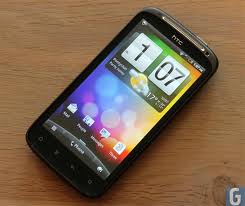
We know that HTC has released the newest smartphone HTC Sensation, which comes in this marketplace today. Right since its announcement, release and subsequent purchases, users have been very needing to root the unit; one due to advantages of rooting, which have been over and over again iterated, another because of the rage against HTC for the anti-rooting campaign. If HTC is brilliant enough to include something called HTC Sync that can forbid rooting, at any expense, our developers are much more developed they uninstall the HTC Sync software and proceed with your rooting. Not strange HTC is mad!
We all know that HTC Sensation relies on a Gingerbread version of Android, or v2.3. The only glitch in rooting this tool and the main difference between rooting the Sensation and other Gingerbread phones is the HTC Sync needs to be temporarily removed the instructions for uninstalling the HTC Sync is found on the internet and can be done simply using any application installer software, that is included by default in all phones or by downloading any software manager software and installing its apk file.
- First download the Gingerbreak.apk file.
- Extract the zip file and save on your computers desktop. This is a precursor for transferring it to your phone.
- Connect the phone to your computer.
- Mount SD card as flash drive as you generally do for USB cable file transfers.
- Copy the downloaded Gingerbread apk file to SD card root.
- You should have any File Manager (e.g., Astro File Manager) on your phone. If not, download from Market. These are generally free apps.
- Disconnect your phone from computer and launch File Manager. You will find in the menu of the phone.
- Follow the onscreen instructions on File Manager to install APK to your phone from SD card root. You may also use the default application installer software to do this.
- After installation completes, open the APK.
- Press root button. Simple, isn’t it?
- The APK exploit will run for some time. Usually it runs for around 10 minutes. Your phone will be rebooted. In case it takes more than ten minutes for auto reboot, please reboot it yourself. Not to panic, this happens a lot of times.
- Your device is now rooted. Congrats!
- Make sure that SuperUser app is installed and is running. This is very important for you to enjoy the benefits of rooting.
In order to test if you are phone has been successfully rooted, just click a screenshot of your phone. That should show that the phone have been rooted.
Disclaimer: The users should keep to the above guidelines at their unique risk. We will not cause any loss anyways.
Monday, August 12, 2013
Motorola ATRIX 2 User Manual Guide PDF
Motorola Atrix 2 has a different design to the previous, now atrix 2 comes with a thinner body size that fits in your gemgaman, the new design is also available on atrix 2 is located on a layout which is no longer using PenTile matrix layout of the screen Atrix. However, using the superior RGB layout and commonly used.
 |
| Google Images |
Motorola Atrix 2 or Edison had pinned an HDMI port on the side next to the USB port and can work with a dock for the Atrix WebTop that made the first edition. Motorola Edison using HSPA + network, and not on the LTE network AT & T. Edison also has a fingerprint scanner found in the Atrix.
[Download Motorola ATRIX 2 User Manual Guide]
Tuesday, August 6, 2013
Samsung Contour 2 Owner Guide

Samsung Contour 2 mobile phone comes with these specification and features:
- Device: Samsung Contour 2
- Carrier: MetroPCS
- Price: $59.00
- Dimension: 1.86″ X 3.82″ X 0.74″
- Weight: 3.6 oz.
- Color: Black and Red
- Network: PCS (1900MHz), Cellular (800MHz), AWS (1700/2100MHz)
- Processor: 192 MHz
- Display: 2.2 inch
- Memory: 40 MB of internal memory
- Card Slot: Yes, Up to 32GB microSD
- Camera: 1.3 MP
- GPS: Yes
- USB: microUSB 2.0
- Bluetooth: V2.1
- Battery: 1000 mAh battery
- Talk time: 5 hours
- Other features: 3.5MM audio jack
To know about operating instruction and also troubleshooting tips of Samsung Contour 2 mobile phone, you can download this Samsung Contour 2 manual / user guide.
Table contents of Samsung Contour 2 user manual
- Getting Started
- Understanding Your Phone
- Menu Navigation
- Entering Text
- Call Functions
- Understanding Your Contacts
- Messages
- Camera
- @Metro
- Multimedia
- Tools
- Voice SVC
- Changing Your Settings
- Health and Safety Information
- Warranty Information
- Index
This Samsung Contour 2 user manual is available for FREE at Samsung website,
Download Samsung Contour 2 user manual.pdf (1.91 MB)
Wednesday, July 24, 2013
Pantech Vega Racer 2 IM A830L User Manual
 |
| Google Images |
- Available 16 GB internal storage, 1 GB RAM, and support microSD, up to 32GBData: GPRS, EDGE, HSDPA, HSUPA, LTE
- Connectivity: Wi-Fi 802.11 a/b/g/n, DLNA, Wi-Fi Direct, dual-band, Wi-Fi hotspot, bluetooth 4.0 with A2DP, microUSB (MHL) v2.0
- Powered by Li-Ion 2020 mAh standard battery capacity
- Network: CDMA 800 / 1900, HSDPA 2100, LTE 800
- Supported by Qualcomm MSM8960 Snapdragon chipset, Adreno 225
- Weight: 134.1 g
- Video: 1080p@30fps, LED video light
- Also equiped with 2 MP secondary camera
- Other specs and features: Vibration, MP3, WAV ringtones, Accelerometer, gyro, proximity, compass, SMS(threaded view), MMS, Email, Push Mail, IM, RSS, HTML, Adobe Flash, A-GPS support, T-DMB TV tuner, TV-out (via MHL A/V link), Active noise cancellation with dedicated mic, SNS applications MP4/H.264/H.263/WMV/DviX/XviD player, MP3/WMA/WAV/eAAC+/AC3 player, Document viewer/editor Organizer Voice memo/dial/commands, Predictive text input.
Friday, July 12, 2013
Samsung Galaxy Tab 2 10 1 Wifi Specifications and Features

The Samsung Galaxy Tab 2 10.1 is the rather wordy successor to the popular Galaxy Tab 10.1, an Android tablet which managed to challenge the iPad in almost every department, which are some pretty big shoes to fill.
Full Specifications of Samsung Galaxy Tab 2 10.1
GENERAL
|
|
- Universal Desk Dock (EDD-D100BEGXAR)
- Detachable Travel Charger (ETA-P11JBEGXAR)
- USB Adapter (EPL-1PL0BEGXAR)
- HDTV Adapter (EPL-3PHPBEGXAR)
- Pouch (Black) (EFC-1B1LBECXAR)
- Book Cover (Black) (EFC-1H8NGECXAR)
- Email (POP3/IMAP/SMTP/SSL/TLS)
- Exchange ActiveSync Email
- Music: MP3, AAC/AAC+/EAAC+, WMA, OGG (vorbis), FLAC, AC-3
- Sound: AMR-NB/WB, WAV, MID, XMF, iMelody, SP-MIDI, RTTTL/RTX, OTA
- Video: 1080p Playback @ 30fps
- Video Codec: Mpeg4, H.264, H.263, VC-1, Divx, VP8, WMV7/8, Sorenson Spark
- Format: 3gp(mp4), wmv(asf), avi(divx), mkv, flv, webm
- GIF, AGIF, JPEG, PNG, BMP, WBMP, WEBP
- SyncML DS V1.2
- SyncML DM V1.2
- Kies / Kies air
- Smart View
0.38 x 10.1 x 6.9 inches
Weight (Including Battery): 1.28 lbs
APPLICATIONS
- Google Play™
- Preloaded - Contacts, Alarm/Clock, S Planner, Camera, Gallery, Google Talk™, Dropbox, Netflix, Gmail™, YouTube™, Web Browser, My Files, Email, AllShare (DLNA), Google Search, Memo, Latitude, Task Manager, Video Player, Media Hub, Game Hub, Amazon Kindle, Calculator, Music Player, Photo Editor, Next Issue, Smart Remote, Settings, ChatON, Readers Hub (Kobo, Zinio, NPD), Samsung Apps, Polaris Office, Google Maps, Play Store, Google Play Books, Google +, Google + Messenger, Google Play Music, Music Hub, Navigation, Places, Video Maker, Google Play Videos, World Clock
SOFTWARE FEATURES
The Tab 2 10.1 is the second Samsung tablet, after the Tab 2 7.0, to ship with Ice Cream Sandwich (Android 4.0.3 to be precise) installed.
Samsungs TouchWiz UX skin is of course included and comes with custom Samsung apps like Music Hub, Media Hub, and Game Hub, a built-in screenshot app, and the Mini Apps tray located on the bottom of the screen. Tapping it brings up a tray of apps consisting of a calculator, notes, calendar, music player, and clock. However, the most useful of these is still the task manager, which allows you to quickly kill any app running in the background; this comes in handy when apps become otherwise unresponsive.
The basic look and design of ICS are retained, just with a TouchWiz skin and a few extra shortcuts for quickly turning off Wi-Fi, GPS, screen rotation, and so on. As an added bonus, Samsung offers 50GB of free Dropbox storage for the first year.
MULTIMEDIA

Tuesday, June 18, 2013
BlackBerry Bold 9780 Onyx 2 User Manual
BlackBerry Bold 9780 Onyx 2 Manual Guide Pdf
 |
BlackBerry Bold 9780 Onyx 2 |
Download The manual documentation Can be found Click Here